Hey there and welcome to this quick and easy guide on how to setup some basic information and formulas in your database program of choice in order to provide you with useful information for your table in just a few keystrokes.
We’re going to create a quick Underdark Random Encounter chart but when we’re done it will also 1) randomize the number of creatures, 2) calculate the total experience value of the group, and 3) provide the party xp split calculation for you.
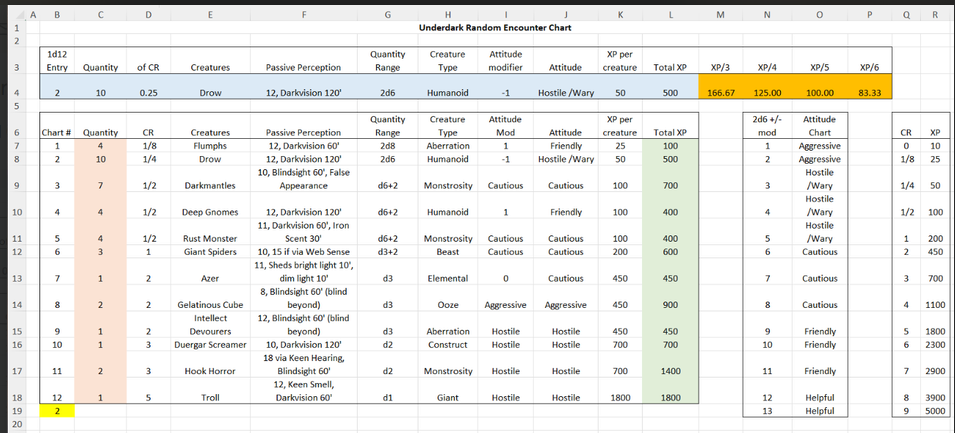
I’ve tried to keep this guide easy to follow – there are only five distinct sets of formulae presented in this guide, color-coded by section. The cells used and referenced are exact so if you have any issues just make sure your value locations are accurate, and further that cell references are pointed at the right place. The order presented builds off of itself so be careful if jumping in halfway. I’m hopeful that seeing how these examples are used will give you the tools to make your own charts that are useful for your table.
Basic layout & setup:
First we’ll setup our quick reference bar. Type the following into cells B3 through P3:

When we’re finished this section will auto-generate our random encounter on Line 4. For now though we’ll skip down. Select cells B3 thru L3, copy, select cell B6, and paste. This is the start of our encounter reference chart.
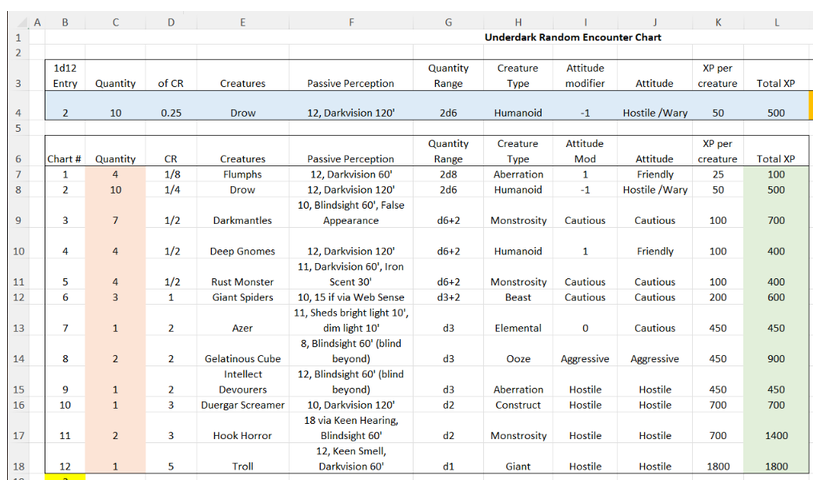
I’ve taken the liberty to pick 12 different creatures that might be encountered down in the Underdark. Feel free to substitute these with whatever you want, we’re just filling in information that’ll be useful later; just skip the colored sections for now. I’ve added default Passive Perception, some special senses useful for the GM to know, possible group size, creature type, and a default attitude towards the party. Your chart should look something like this:
Pink – Basic dice calculations:
We are going to enter the formulae in cells C7 through C18, using the Quantity Range values in G7:G18 as a reference – adjust as appropriate if you have substituted your own values.
Cell C18 is the easiest so we’ll start there. A d1 can only ever be 1 so we’ll place that there.
Cells C16 and C17 are d2 creatures each. We’ll use the following function for the rest of these entries:
=RANDBETWEEN(1,2)
This gives us a random integer between the two values 1 and 2. Cells C13:C15 represent d3, so:
=RANDBETWEEN(1,3)
Next is C12 and we need something a little different. This one is D3+2. We can add this as:
=RANDBETWEEN(1,3)+2
This will give a final value of either 3, 4, or 5 Giant Spiders. The next three lines are similar, D6+2:
=RANDBETWEEN(1,6)+2
In cell G8 we see something a little different: 2d6 instead. In this case we’ll duplicate the function:
=RANDBETWEEN(1,6)+RANDBETWEEN(1,6)
Finally, G7 calls for 2d8 flumphs but I want more. Let’s boost that to 2d8+2 instead! Enter this in C7:
=RANDBETWEEN(1,8)+RANDBETWEEN(1,8)+2
Let’s give these random values a test. In Excel you can manually generate random values by hitting F9, or Shift+Ctrl+F9 in LibreOffice or OpenOffice.
Green – Total XP calculations
Now that we have our monster counts in the C column we can easily count up the total XP for each possible encounter. Left-click in cell L7 and enter the following:
=C7*K7
This will simply take the number of creatures calculated in C and multiply it by the base XP per Creature we filled out earlier in the K-column. Copy cell L7, select cells L8:L18, and paste. These values should auto-calculate for you but if you click on them you should see that the reference cells have changed for you: L8’s cell should read “=C8*K8”, while L18’s cell should be “=C18*K18”. This is exactly what we want – each line is calculating unique values based on XP rates and creature count.
Yellow – Chart Randomizer
Blink and you’ll miss it! We’re going to setup a random value between 1:12 so the quick lookup knows which line to use. In cell B19 we’re going to type:
=RANDBETWEEN(1,12)
Blue – The rolled encounter, pre-filled with almost everything we need.
This is seriously the hardest thing we have to cover today so I’ll go over it in a little more detail. VLOOKUP is a super useful tool that returns a subset of information based on matching values in a larger set. The $ icon shows that a value is locked in the formula and won’t change if it is copied elsewhere (like how we did Green before). Here’s the general format for reference:
=VLOOKUP(reference value, top left corner of the chart/data to reference : bottom right corner of the chart/data to reference, how many cells to the right of the matching value within the chart that you want to reference (0 is the first value), and finally either “0” for an exact match (recommended) or “1” for an approximate match.) No spaces.
In our case we’ll start with B4:
=VLOOKUP($B$19,$B$6:$L$18,1,0)
If entered correctly this should simply match the value in cell B19 for now. Let’s do C4:
=VLOOKUP($B$19,$B$6:$L$18,2,0)
D4:
=VLOOKUP($B$19,$B$6:$L$18,3,0)
All the way to L4 following the same pattern. You can copy and paste but you’ll need to change the 4th value accordingly. If you’ve gotten through all that with no problems than you’re better at this than I am. The rest is super easy, barely an inconvenience:

Orange – XP Party Split
Now that we used our base data to generate a random quantity of monsters, used that to calculate the total xp, and randomized which creature(s) are on deck, we can finish up by splitting the XP among the players.
In cell M4 representing a three-way split we’re going to type
=L4/3
In cell N4 representing a four-way split:
=L4/4
In O4, a five-way:
=L4/5
And in P4, a six-way split:
=L4/6
That’s it, you’ve got your charts all ready to roll. Remember to use F9 (or Shift+Ctrl+F9) to randomize your values. Name your new file something you’ll remember. You can copy/paste the whole sheet unto another tab if you want to save yourself some time making different biomes or even customizing your dungeons with unique wandering monsters, gold generation, or exploding treasure tables.
Expanded Options:
You’re free to add whatever you’d find useful to the reference table. Perhaps you want to include a list of damage resistances, HP, or basic attacks – you could even automate the damage rolls themselves by changing some of the formulae presented here. Try adjusting the contents of cell C29 to create an Initiative randomizer. If you plan on making a larger chart it might be useful to have a CR → XP calculator to save you from having to manually enter the information each time – try using the VLOOKUP function as shown in the Blue section.
Challenge:
I’ve seeded the option of a variable Attitude Chart – old school RPGs would often randomize the demeanor of encountered creatures – you can combine the Attitude modifiers found in Column-I w/ the chart in column-N to add an extra layer of variability to your random encounters. To make this work you’ll need to use the formulae presented in yellow, pink, and blue above.
Good luck, have fun!
=Thorn
Forever DM
Cat Dad
Head of the Deathskull Boyz gaming club
Amateur game designer
Alliance guild leader of the Scarlet Brotherhood, Warmane – Icecrown server, WoW